
Over 43% of the websites use WordPress, and that gives it the distinction of being the most frequently attacked CMS out there. Recently, a new malware attack has been identified which uses WordPress to not just hack into sites but make these same sites a source of attacks launched at the visitors themselves. This malware campaign goes by the name of ClickFix, and its scope exceeds most expectations.
What is disturbing about the above mentioned malware attack is the fact that the attackers rely on the very element which should have put visitors’ minds at ease, Cloudflare. This company provides some of the most recognized web services available, but the human verification page with “Checking your browser before accessing…” can easily be turned against its users.
The Real vs. Fake Cloudflare Check
Verification by Cloudflare’s Turnstile system takes place solely in a web browser and doesn’t involve any system-level input. There will be no request for opening the terminal window and executing commands there. Ever.
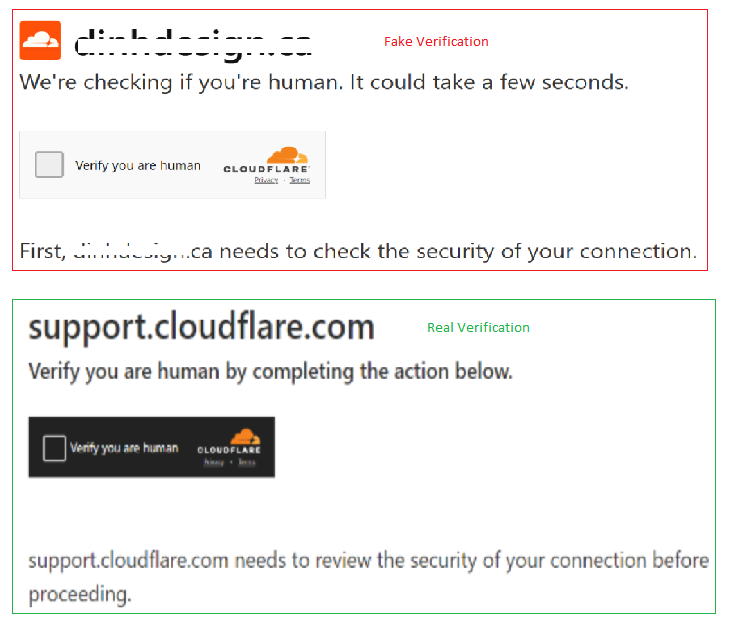
The real Turnstile from Cloudflare works purely in the browser, with only interaction with checkboxes and background checks needed. It wouldn’t need to access any other software than your web browser. Any instructions involving the following actions mean that your computer is being targeted by fraudsters:
- Opening up Command Prompt or PowerShell and running commands from there
- Launching any scripts or programs from your computer
- Copying and pasting the command in any program
Any attempt to do that should be immediately abandoned. Branding that perfectly matches Cloudflare’s website doesn’t make it safe either; the very idea of performing such actions means fraud.
As the platform owner, you can’t say that keeping your platform safe from any threats is someone else’s responsibility. An infected WordPress system is a threat to the users who visit it and must be audited regularly.
How Your WordPress Site Gets Weaponized
ClickFix poses an especially dangerous threat, as your website’s visitors could become the targets without your committing any malicious act.
The initial access is facilitated through vulnerabilities. Expired plugins, password reuse, and unpatched themes provide the opportunity that hackers need. No technical expertise is needed for the attack.
The hidden code is all that’s necessary. After accessing a website, hackers install a piece of JavaScript, disguised as a performance enhancement that executes in the background. It is programmed to be inactive when there is a logged-in administrator.
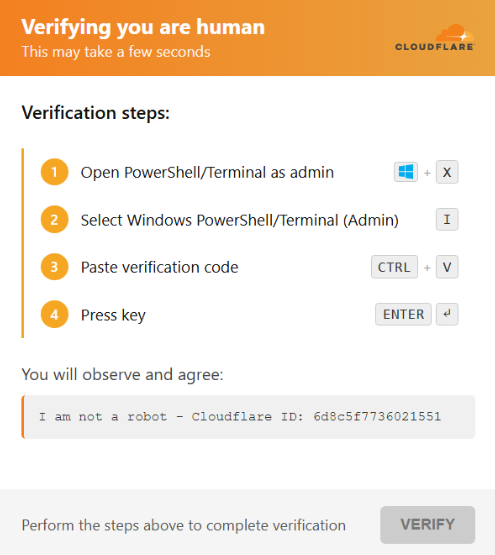
Your visitors get a misleading validation prompt. The embedded code connects to the server controlled by hackers, downloads the false Cloudflare CAPTCHA, and shows it to your visitors to look identical to the genuine one.
It is part of an extensive and ongoing effort. According to Rapid7, the click-fixing campaign started in December 2025 and targeted more than 250 sites in 12 countries, including the UK, the US, Germany, India, Australia, and more. Hackers have had their infrastructure up and running since July 2025.
What the Malware Actually Does
The effects of this attack, once initiated by the visitor, will be drastic and usually instantaneous, consisting of any or all of the following actions performed by the payload:
- Lumma Stealer: collects stored passwords, cookies, and cryptocurrency wallets.
- Vidar Stealer: steals credentials and session tokens for account takeover without the need for the actual password.
- Remote Access Trojans (RATs): allow hackers to gain persistent access to the victim’s computer, even long after the infection itself.
- Ransomware loaders: prepare to encrypt the files, possibly weeks after the first infection.
ClickFix’s main strength lies in its evasion technique. As it involves typing the malicious code from memory, most security systems installed on the endpoint will not be triggered. The lack of downloads, exploits, or suspicious files allows the hacker full access to the victim’s system in a way that most other malware cannot.
This technique was added to the MITRE database in March 2025 under the designation T1204.004 – Malicious Copy and Paste. According to the analysis of Microsoft Threat Intelligence Center, in 2025, the majority (47%) of intrusions began with ClickFix. Furthermore, the campaign has expanded to macOS computers.
How to Protect Your WordPress Site
Proper protection of your WordPress site from ClickFix-type exploitation can be done using good security practices on an ongoing basis. Here is how you can mitigate the risks caused by the above attacks.
Always keep everything updated. Using outdated software remains the easiest way to penetrate a WordPress site and get the job done. You need to use any possible option to automate updates, audit your plugins, and delete those you do not use anymore or which come from unknown vendors.
Use a Web Application Firewall (WAF). WAF blocks malicious requests to the website and prevents them from reaching the system. Among known services that can be considered reliable for blocking potential attacks, there are Cloudflare, Sucuri, and Wordfence Premium.
Use a scan for injected scripts. There are special applications, such as Wordfence and Sucuri Security, which allow detecting changes to any files. As far as the scripts are concerned, it is their addition or modification that needs to be detected.
Use Multi-Factor Authentication (MFA). Credential theft continues to be a serious problem for WordPress sites. If you implement MFA for accessing the admin panel, stealing passwords will not mean anything to hackers.
Monitor server logs. Login and registration attempts by unknown users may indicate a threat. Also, look out for any unfamiliar administrator accounts and new plugin installation attempts. All these actions can be automated using a security application.
Always use strong and unique passwords. Use strong and different credentials for accessing different websites, including your WordPress admin, your hosting control panel, FTP and databases.
How to Distinguish the Legitimate Cloudflare Verification from a Fake
The Turnstile by Cloudflare authentication process is one that takes place within a web browser alone. This either entails an interaction with a check box or is done silently in the background with no need for additional user input.
Anything else that may be required for something to be done would be an indication that what you are seeing is false. More specifically, you should not see anything involving your being asked to open the Command Prompt window and run a command or PowerShell script on Windows.
| Steps | Real Cloudflare Turnstile | Fake ClickFix Prompt |
| User action required | Checkbox click or passive check | Open terminal / Run dialogue |
| Command execution | Never | Required to “complete verification.” |
| System-level access | Never requested | Central to the attack |
| Visual design | Cloudflare branded | Identical to real Cloudflare branding |
No matter how similar such an instruction might look visually to actual Cloudflare processes, that doesn’t really mean anything, as the fake instructions are designed to do that very thing on purpose.

Vin Sonpal is based in Mississauga, Ontario, and is the founder of CS Web Solutions, established in 2015. He works across web, mobile, and digital platforms, helping businesses build online systems that are practical, scalable, and designed to support long-term growth.