
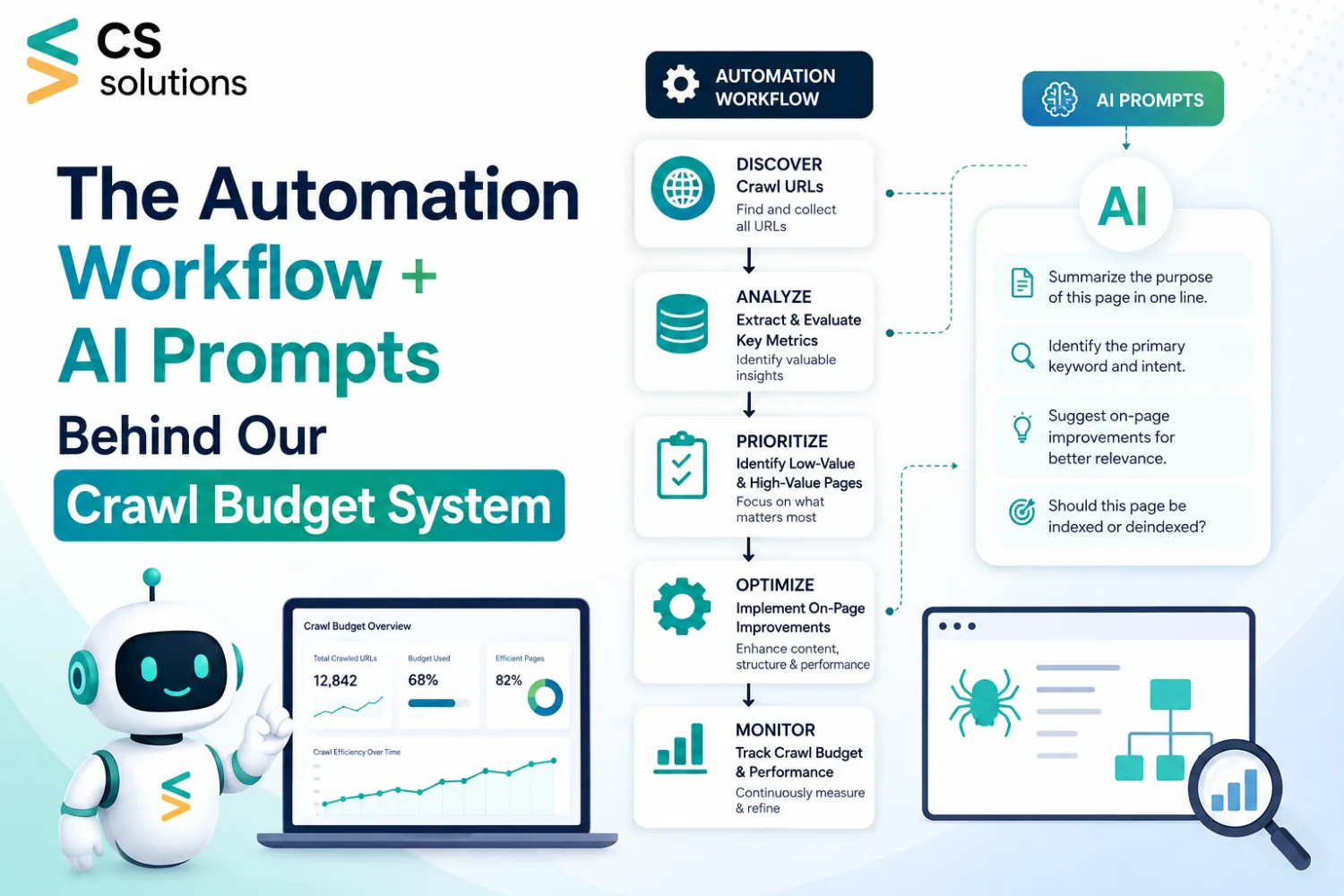
No expensive tools. No manual audits every week. Here is the exact system — the triggers, the automation stack, and the AI prompts that handles crawl budget management on autopilot.
There is a gap that most SEO content never addresses. Checklists tell you what to fix. Nobody talks about what happens after you close the tab — how the same audit runs next week, and the week after, without consuming half a workday every time. This post covers exactly that: the automation layer and the AI prompts that run the crawl budget process consistently, without manual intervention.
PART 01 The Automation Workflow
The goal behind this system is straightforward: instead of pulling data from five different platforms and cross-referencing manually, the workflow does the fetching, the comparing, and flags only what genuinely needs attention. Here is how it is structured.
STEP 01
Scheduled GSC Data Pull — Weekly Trigger
A Make (formerly Integromat) scenario fires every Monday morning. It connects to the Google Search Console API and pulls three data sets: pages with “Crawled – currently not indexed” status (with a count delta from the prior week), any new URLs entering “Discovered – currently not indexed,” and pages showing a drop in crawl frequency week-over-week.
All of this lands in a central Google Sheet with timestamps on every row — tracking trends rather than isolated snapshots.
Why this matters: Most teams check GSC reactively, after something breaks. This approach makes crawl monitoring proactive — issues are visible as they form, not after they compound.
STEP 02
Sitemap Health Scanner
A second Make scenario runs in parallel. It fetches the XML sitemap and runs each URL through a quick status check covering three signals:
HTTP response code (catching 404s and redirect chains automatically), whether the URL carries a noindex tag in the rendered HTML, and whether the canonical tag points to itself or redirects elsewhere.
Any URL failing more than one check gets flagged in a dedicated “Sitemap Cleanup” tab with a pre-populated suggested action: remove, redirect, or fix canonical.
Tool stack for this step: Make + Google Sheets + a lightweight custom HTTP module for status checks. No paid crawler required.
STEP 03
Internal Link Depth Mapper
This step requires slightly more setup, but delivers the most consistent value over time. Screaming Frog runs on a scheduled crawl via command line using a saved config file. The output pushes into Google Sheets via a Python script.
The script then flags two categories automatically:
High-priority pages (defined by a maintained list of revenue and target pages) that sit more than 3 clicks from the homepage — and orphan pages that appear in the sitemap but receive zero internal links from any crawled page.
Result: A clean, actionable internal link fix list arrives every week without ever manually opening a crawl tool.
PART 02 The AI Prompts
Once the automation surfaces flagged pages — thin content, crawled-but-not-indexed URLs, low-value sitemap entries — each one does not get reviewed manually. A set of AI prompts handles the decision-making layer, producing faster and more consistent outputs at scale.
These prompts are designed to work with any major LLM. Copy them directly.
↳ Prompt 1 — Page Value Scoring
Use this when working through a list of flagged low-traffic pages and a decision is needed: keep, improve, noindex, or remove?
AI Prompt — Page Value Score
You are an SEO strategist. Below is a list of URLs with the following data points for each: monthly organic traffic, number of referring domains, word count, and whether it receives any internal links.
Score each page from 1–10 on crawl budget worthiness using this framework:
– 8–10: Worth crawling. Keep and potentially improve.
– 5–7: Borderline. Needs improvement before it earns crawl budget.
– 1–4: Remove from sitemap or add noindex.
For each page, return: the score, a one-line reason, and a recommended action.
Format as a table. No intro or preamble.
Here is the data: [PASTE DATA]
↳ Prompt 2 — Thin Content Diagnosis
Use this when a page is getting crawled but not indexed and the root cause needs diagnosing before deciding what to do with it.
AI Prompt — Thin Content Diagnosis
You are a technical SEO specialist. Below is the full text content of a webpage that Google has crawled but refused to index.
Analyse it and return:
1. The most likely reason Google is not indexing it (be specific)
2. Whether the page is worth saving or should be noindexed
3. If worth saving: the top 3 content improvements that would make it index-worthy
4. Estimated fix effort: Low / Medium / High
Be direct. No filler.
Here is the content: [PASTE PAGE CONTENT]
↳ Prompt 3 — Internal Link Anchor Text Generator
Use this after identifying orphan pages or pages with poor internal link depth. Rather than writing anchor text manually for every fix, this prompt generates the full context for each one.
AI Prompt — Internal Link Builder
Internal links need to be added to the following target page from other pages on the site.
Target page URL: [URL]
Target page topic: [BRIEF DESCRIPTION]
Here are 5 existing pages to add internal links from:
[LIST PAGES + THEIR TOPICS]
For each source page, provide:
– The exact anchor text to use (natural, not over-optimised)
– Where in the content it would logically fit (intro / body / conclusion)
– One sentence of surrounding context so it reads naturally
Format as a table.
↳ Prompt 4 — Redirect Chain Fix Instructions
When Screaming Frog flags a chain of redirects, this prompt generates developer-ready fix instructions without having to explain context from scratch each time.
AI Prompt — Redirect Chain Audit
Below is a list of redirect chains found on a website. Each row shows: starting URL → intermediate URL(s) → final destination.
For each chain:
1. Identify if this is a crawl budget problem, a link equity problem, or both
2. Write a one-line developer instruction for fixing it
3. Flag any chains where the final destination returns a non-200 status
[PASTE REDIRECT CHAIN DATA]
PART 03 Real-Time Monitoring & Alerts
The automation and AI powered prompts handle the weekly deep audit. But crawl issues do not wait for Monday. The monitoring layer below runs continuously and flags problems before they turn into conversations a client has to start.
| Index Count Drop | Sitemap Error Spike | Core Page Crawl Frequency Drop |
| A Make scenario pings the GSC API every 48 hours and compares total indexed page count against the rolling 7-day average. If it drops beyond threshold, a Slack alert fires immediately with the delta and a direct link to the GSC coverage report. | A parallel 48-hour check fetches the sitemap and calculates the ratio of 200-status URLs to total URLs. A drop below the threshold triggers an alert. Simple, but it catches mass-noindex accidents and bulk redirect issues before they impact rankings. | A curated list of ~20 critical pages per site (homepage, key service pages, top revenue pages) gets monitored via the GSC URL Inspection API. If Googlebot has not visited a critical page within the defined window, an alert fires immediately. |
| Threshold: >5% drop | Threshold: <90% healthy | Threshold: >14 days uncrawled |
Why the 14-day crawl gap alert matters
A page Googlebot stops visiting regularly is a page Googlebot is deprioritising. That shift rarely announces itself. Catching a 14-day gap on a revenue page gives enough runway to diagnose and fix the issue before rankings begin to slip — which typically takes another 2–4 weeks to appear in data.
PART 04 The Full Tool Stack
Every tool in this system is either free or low-cost. The entire stack runs on less than £150/year if Screaming Frog is included.
| Tool | Role in the System | Cost |
| Make (Integromat) | Automation triggers API connections,Scheduling | Free tier |
| Google Search Console API | Crawl data, index status, URL inspection | Free |
| Google Sheets | Central audit log and data store | Free |
| Screaming Frog (CLI) | Weekly crawl, internal link depth, redirect mapping | £149/year |
| Python (scripts) | Data processing and Sheets integration | Free |
| Slack | Alert delivery channel | Free tier |
| Any LLM (ChatGPT / Claude) | Running the four AI prompts above | Free tier |
What This System Actually Changes
Before a system like this, crawl budget tends to get looked at when a client asks why traffic is down. Reactive, and always a step behind.
With this setup, crawl budget is monitored continuously, audited weekly, and fixed in batches — with AI handling the decision-making on borderline pages instead of deliberating over each one individually. The checklist does not change. What changes is that a human is not the one running it every week.
Cleaner architecture. Faster indexing. Better rankings. And none of it requires an enterprise AI SEO tool subscription to maintain.
In This Article
Want an SEO system that runs on autopilot? Our team builds them for you.
Topics Covered
- Technical SEO
- Crawl Budget
- Automation
- AI Prompts
- Make.com
- Google Search Console
- Index Optimization

Vin Sonpal is based in Mississauga, Ontario, and is the founder of CS Web Solutions, established in 2015. He works across web, mobile, and digital platforms, helping businesses build online systems that are practical, scalable, and designed to support long-term growth.